

We all know that to spot good coins early, you need to set up the right filters on Axiom Trade. Proper filters make a huge difference in finding strong coins fast so you can enter early and maximize profit. They also help you, to some extent, avoid bundled or farmed coins.
In this guide, I’ll explain what each filter does and share the exact filters I use — the ones that helped me become consistently profitable.
Understanding Filters
In Axiom Trade, you have filters for three main sections:
- New Pairs – shows coins immediately after they’re created.
- Final Stretch – coins that already have some volume and market cap.
- Migrated – coins that have passed the bonding curve.
Protocols
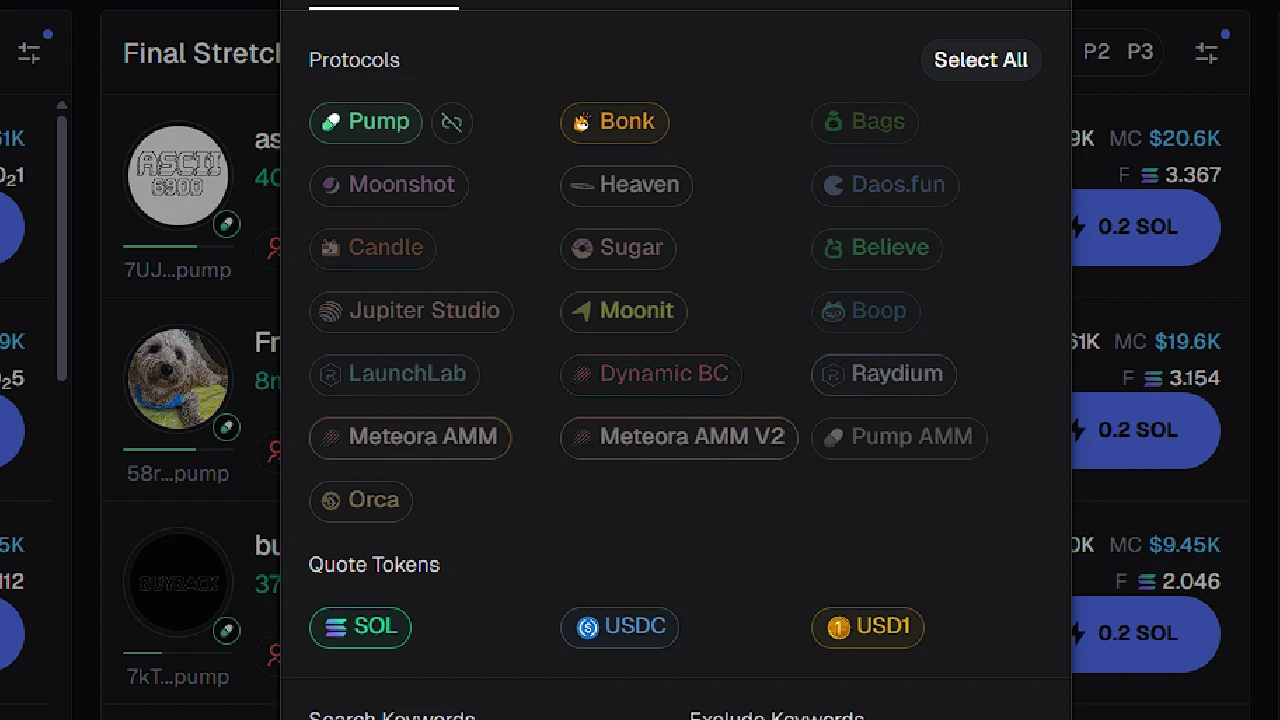
This is where you choose which protocols to show or hide.
There are quite a few options, but if you’re a new trader, I recommend turning all of them off except for Pump and Bonk.
Once you gain more experience, you can experiment with others. The reason I don’t recommend using other protocols early is because 90% of them are scams or give terrible entries due to snipers.
So, for now — keep only Bonk and Pump on until you get good at trading new pairs.
Audits Section
Dex Paid – Useless for new pairs. It only shows coins that already have Dex Screener data paid. New coins under 20K MC rarely have it, and those that do are usually fully bundled. Most good coins hit high MC without Dex Screener data, so keeping this on will make you miss great entries.
CA ends in Pump – Also useless. Ignore it.
Age – Leave blank for new pairs. You want to see coins immediately when they spawn. In Final Stretch, you can set a limit (e.g., 1 hour) to remove older coins that failed to bond. Those are usually dead or farmed.
Top 10 Holders % – Shows how much supply is held by the top 10 wallets. For new pairs, high percentages are normal. But if the top 10 holders own over 30%, it’s likely a bundled coin or dev sniped their own coin. Avoid buying until you do some research.
Dev Holding % – Shows how much supply the dev holds. If the dev owns more than 5%, it’s risky. I usually leave this blank to research manually. If you filter it out completely, you won’t see coins until the dev sells — and you could miss entries.
Snipers % – Most snipers are dev wallets entering their own coins early. I set 10% max here to clean out farmed coins and avoid quick-buy mistakes.
Insiders % – Not important. Leave blank.
Bundle % – Tricky filter. For new pairs, you don’t need it, or you can set 20% max just to clear out obvious bad coins. For Final Stretch and migrated do leave Bundle section blank. Even if a coin shows higher bundling (like 30–40%), it doesn’t always mean a rug — it could have good wallets and copy traders, which appear bundled. If you see over 30%, check the wallets manually. Tracking wallets is key.
Holders – Not important. 100 small holders or 30 big ones doesn’t mean much.
Pro Traders – Not very relevant for new pairs. However, in Final Stretch, if a coin has many holders but few Pro Traders, it’s usually bundled.
Dev Migrations – Number of coins migrated from that dev. Completely useless for new pairs.
Dev Pairs Created – Also not important. A dev might have made 1,000 coins, and the next one could still moon. Leave blank.
Metrics Section
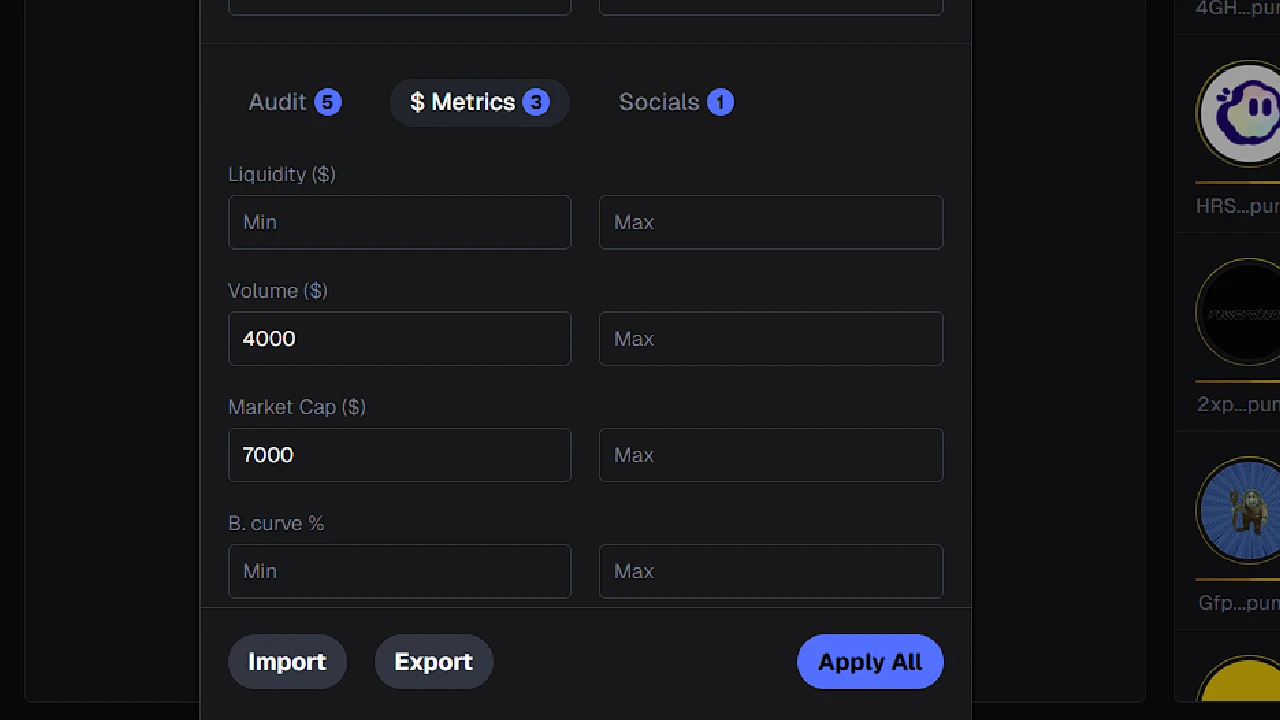
Liquidity – Since we’re trading Bonk and Pump coins, you can leave this empty.
Volume – Shows the total amount of buys and sells combined. Not needed for new pairs, but very useful for Final Stretch or Migrated sections. If a coin has high MC but low volume, it’s likely bundled or manipulated.
Market Cap – Not needed for new pairs, but use it in Final Stretch to filter out dead coins.
Bonding Curve % – Shows how much of the bonding curve is completed. Not needed at all.
Global Fees Paid – Displays how much was paid in fees from buys and sells. Leave it blank for filters — better to check it visually in the display section. If a coin has high MC and high volume but low fees, it’s likely fully bundled.
TXNs / Num Buys / Num Sells – Only useful in Migrated, where you can filter out bundled coins. For new pairs, ignore it.
Socials Section
Twitter Reuses – Shows how many times the Twitter account linked to the coin changed names. Completely useless unless you’re dealing with big non-meme projects.
Tweet Age – Age of the tweet linked to the coin. Also not very useful — old tweets can still pump hard. Some coins have gone viral even with tweets from 1,000 days ago.
At Least One Social – Means the coin has at least one linked social (like Twitter). I always keep this ON for New Pairs to filter out spam coins. For Final Stretch and Migrated, you can turn it off occasionally, though most real coins already have socials linked by then.
Best Filter Settings
I personally use minimal filters, since I can spot good coins at a glance. With practice, your brain adapts — you’ll start filtering trash coins automatically. That’s why you need to trade daily to train your instincts.
But if you’re a new trader or want to filter out most of the junk fast, here are the filters for Axiom Trade that worked best for me when I was learning. They’ll help you avoid rugs and farm coins to a large extent.
New Pairs
- Protocols: Keep only Pump and Bonk ON
- Snipers: 10% max
- Dev Holding: 10% max
- Volume: $500+
- Market Cap: $5,000+ (adjust based on average spawn MC)
- At least one social: ON
Final Stretch
- Age: 20 minutes max
- Top 10 Holders: 40% max
- Snipers: 10% max
- Dev Holding: 10% max
- Min Pro Traders: 3
- Volume: 7,000+
- Market Cap: 6,000+ (depends on average spawn MC)
Migrated
- Top 10 Holders: 40% max
- Snipers: 10% max
- Dev Holding: 10% max
- Min Pro Traders: 3
- Global Fees Paid: 1.5 SOL
By using these filters, you’ll drastically reduce the number of bad or bundled coins you see — allowing you to focus only on real opportunities and get early entries into coins with real potential.